NULSPEC

H3 inference / schedule comparison

Scheduling is all you need: use sparsity to save time while controlling loss.

Six MiniMax H3 execution paths receive the same first frame, prompt, seed, checkpoint, resolution, and duration. The Turbo profile and attention schedule change; measured wall time is reported for every sequence. A complete 55-render integer handoff sweep follows at the bottom.

Sequences
6 + 55 sweep
Seed
260827104729
Format
768² · 15.08 s
Base
MiniMax H3 FL2VA

01 / 4-step family

Four-step trajectory

The dense and 2→2 paths use four evaluations. The 2→4 path adds dense subdivisions across the trajectory's final half for six evaluations total.

4-step family

Dense 4 · SageAttention

4 NFE
99.8 stiming baseline
Adapter
H3 Turbo 4-step
Sampler / scheduler
Euler / Simple
Shifts
6 / 3
Attention path
SageAttention × 4
Noise schedule
One complete 4-step sigma schedule

The dense four-step sequence completed in 99.8 seconds. It is the timing baseline for the other four-step schedules.
4-step family

Sparse 2 → dense 2

4 NFE
75.2 s24.5 s saved · 24.6%
Adapter
H3 Turbo 4-step
Sampler / scheduler
Euler / Simple
Shifts
6 / 3
Attention path
Sparse Kitchen at 30% video KV × 2 → SageAttention × 2
Noise schedule
One complete 4-step sigma schedule; handoff at midpoint

Making the first half sparse while keeping four total evaluations reduced wall time to 75.2 seconds—a saving of 24.5 seconds, or 24.6%.

4-step family

Sparse 2 → dense 4

6 NFE
94.7 s5.0 s saved · 5.0%
Adapter
H3 Turbo 4-step
Sampler / scheduler
Euler / Simple
Shifts
6 / 3
Attention path
Sparse Kitchen at 30% video KV × 2 → SageAttention × 4
Noise schedule
Four-step trajectory; final half subdivided into 4 dense evaluations

Spending four dense evaluations over the final half completed in 94.7 seconds. That saved 5.0 seconds, or 5.0%, against the dense four-step baseline while using six evaluations.

02 / 8-step family

Eight-step trajectory

All three paths use the same eight-step Turbo adapter, shifts, sampler, scheduler, and complete sigma schedule. The attention path is the changing variable.

8-step family

Dense 8 · SageAttention

8 NFE
184.3 stiming baseline
Adapter
H3 Turbo 8-step
Sampler / scheduler
Euler / Simple
Shifts
12 / 3
Attention path
SageAttention × 8
Noise schedule
One complete 8-step sigma schedule

The dense eight-step sequence completed in 184.3 seconds. It is the timing baseline for the other eight-step schedules.

8-step family

All sparse 8

8 NFE
126.8 s57.6 s saved · 31.2%
Adapter
H3 Turbo 8-step
Sampler / scheduler
Euler / Simple
Shifts
12 / 3
Attention path
Sparse Kitchen at 30% video KV × 8
Noise schedule
One complete 8-step sigma schedule; no stage handoff

Keeping all eight evaluations sparse completed in 126.8 seconds. That saved 57.6 seconds, or 31.2%, against the dense eight-step baseline.

8-step family

Sparse 4 → dense 4

8 NFE
149.1 s35.2 s saved · 19.1%
Adapter
H3 Turbo 8-step
Sampler / scheduler
Euler / Simple
Shifts
12 / 3
Attention path
Sparse Kitchen at 30% video KV × 4 → SageAttention × 4
Noise schedule
One complete 8-step sigma schedule; handoff at midpoint

Changing from sparse to dense attention at the midpoint completed in 149.1 seconds. That saved 35.2 seconds, or 19.1%, against the dense eight-step baseline.

Exact fixed prompt
integrated_multimodal_description:
<Picture 1> is the exact first frame. Preserve the exact on-screen subject visible in this image, including its identity, species-defining anatomy, head and facial structure, surface covering, proportions, clothing, background, framing, and lighting. Do not humanize the subject or change its species. [Shot 1] One continuous, natural medium close-up with a locked camera. The subject looks directly into the camera, blinks naturally, makes small restrained head and hand movements, and speaks clearly with calm confidence. Keep the subject's face stable and mouth movement precisely synchronized. (S1), the on-screen subject, says: <d>[English] Atlas began with a simple idea: creative tools should work together instead of getting in the way. We connected the first pieces, tested them on real projects, and kept refining them until Atlas became a practical creative partner.</d> The subject finishes the sentence, closes its mouth naturally, and holds eye contact for the final moment. No cuts, no camera movement, no captions, no subtitles, no logos, and no visible text.
overall_soundscape:
Clean close-miked speech from (S1), subtle natural room tone, quiet breathing, and faint clothing movement. No other voices or prominent environmental sounds.
non_diegetic_music:
N/A

55-run timing overview

Generation time at every handoff

Each line moves from an all-dense schedule at 0% sparse to an all-sparse schedule at 100%. Lower is faster. The panels use labeled but different vertical ranges so the shape of each Turbo family remains readable; the exact ledger below carries every measured value.

21 measured sequences

Turbo 4-step

4 NFE6 NFE8 NFE
Turbo 4-step generation timesWall time in seconds by share of sparse attention. Lower points are faster. Each line represents one total-NFE budget.60s90s120s150s180s0%25%50%75%100%4 NFE, All dense · 4 steps: 85.9 seconds4 NFE, 1 sparse → 3 dense: 86.1 seconds4 NFE, 2 sparse → 2 dense: 79.7 seconds4 NFE, 3 sparse → 1 dense: 73.1 seconds4 NFE, All sparse · 4 steps: 67.9 seconds6 NFE, All dense · 6 steps: 139.3 seconds6 NFE, 1 sparse → 5 dense: 131.3 seconds6 NFE, 2 sparse → 4 dense: 124.2 seconds6 NFE, 3 sparse → 3 dense: 110.9 seconds6 NFE, 4 sparse → 2 dense: 107.4 seconds6 NFE, 5 sparse → 1 dense: 101.8 seconds6 NFE, All sparse · 6 steps: 94.8 seconds8 NFE, All dense · 8 steps: 181.8 seconds8 NFE, 1 sparse → 7 dense: 173.7 seconds8 NFE, 2 sparse → 6 dense: 166.9 seconds8 NFE, 3 sparse → 5 dense: 158.0 seconds8 NFE, 4 sparse → 4 dense: 146.1 seconds8 NFE, 5 sparse → 3 dense: 142.1 seconds8 NFE, 6 sparse → 2 dense: 131.5 seconds8 NFE, 7 sparse → 1 dense: 126.4 seconds8 NFE, All sparse · 8 steps: 123.5 secondsSHARE OF EVALUATIONS USING SPARSE ATTENTIONGENERATION TIME

34 measured sequences

Turbo 8-step

4 NFE6 NFE8 NFE12 NFE
Turbo 8-step generation timesWall time in seconds by share of sparse attention. Lower points are faster. Each line represents one total-NFE budget.60s100s140s180s220s260s0%25%50%75%100%4 NFE, All dense · 4 steps: 95.5 seconds4 NFE, 1 sparse → 3 dense: 88.8 seconds4 NFE, 2 sparse → 2 dense: 81.8 seconds4 NFE, 3 sparse → 1 dense: 72.6 seconds4 NFE, All sparse · 4 steps: 68.0 seconds6 NFE, All dense · 6 steps: 139.1 seconds6 NFE, 1 sparse → 5 dense: 130.7 seconds6 NFE, 2 sparse → 4 dense: 126.0 seconds6 NFE, 3 sparse → 3 dense: 111.7 seconds6 NFE, 4 sparse → 2 dense: 104.5 seconds6 NFE, 5 sparse → 1 dense: 99.2 seconds6 NFE, All sparse · 6 steps: 94.7 seconds8 NFE, All dense · 8 steps: 182.7 seconds8 NFE, 1 sparse → 7 dense: 175.0 seconds8 NFE, 2 sparse → 6 dense: 165.8 seconds8 NFE, 3 sparse → 5 dense: 158.4 seconds8 NFE, 4 sparse → 4 dense: 146.2 seconds8 NFE, 5 sparse → 3 dense: 137.7 seconds8 NFE, 6 sparse → 2 dense: 130.8 seconds8 NFE, 7 sparse → 1 dense: 126.4 seconds8 NFE, All sparse · 8 steps: 125.7 seconds12 NFE, All dense · 12 steps: 263.6 seconds12 NFE, 1 sparse → 11 dense: 262.1 seconds12 NFE, 2 sparse → 10 dense: 251.4 seconds12 NFE, 3 sparse → 9 dense: 241.6 seconds12 NFE, 4 sparse → 8 dense: 229.1 seconds12 NFE, 5 sparse → 7 dense: 220.2 seconds12 NFE, 6 sparse → 6 dense: 216.1 seconds12 NFE, 7 sparse → 5 dense: 209.1 seconds12 NFE, 8 sparse → 4 dense: 201.6 seconds12 NFE, 9 sparse → 3 dense: 193.8 seconds12 NFE, 10 sparse → 2 dense: 187.0 seconds12 NFE, 11 sparse → 1 dense: 186.1 seconds12 NFE, All sparse · 12 steps: 183.3 secondsSHARE OF EVALUATIONS USING SPARSE ATTENTIONGENERATION TIME
Exact wall time for all 55 integer-boundary renders
ProfileTotal NFESparse → dense pathWall timeVs. denseReduction
Turbo 44All dense · 4 steps85.9 sbaseline
1 sparse → 3 dense86.1 s0.3 s longer-0.3%
2 sparse → 2 dense79.7 s6.2 s saved7.2%
3 sparse → 1 dense73.1 s12.8 s saved14.9%
All sparse · 4 steps67.9 s18.0 s saved20.9%
Turbo 46All dense · 6 steps139.3 sbaseline
1 sparse → 5 dense131.3 s8.0 s saved5.7%
2 sparse → 4 dense124.2 s15.1 s saved10.8%
3 sparse → 3 dense110.9 s28.4 s saved20.4%
4 sparse → 2 dense107.4 s31.8 s saved22.9%
5 sparse → 1 dense101.8 s37.4 s saved26.9%
All sparse · 6 steps94.8 s44.5 s saved32.0%
Turbo 48All dense · 8 steps181.8 sbaseline
1 sparse → 7 dense173.7 s8.1 s saved4.5%
2 sparse → 6 dense166.9 s14.9 s saved8.2%
3 sparse → 5 dense158.0 s23.8 s saved13.1%
4 sparse → 4 dense146.1 s35.7 s saved19.6%
5 sparse → 3 dense142.1 s39.7 s saved21.9%
6 sparse → 2 dense131.5 s50.3 s saved27.7%
7 sparse → 1 dense126.4 s55.4 s saved30.4%
All sparse · 8 steps123.5 s58.3 s saved32.1%
Turbo 84All dense · 4 steps95.5 sbaseline
1 sparse → 3 dense88.8 s6.7 s saved7.0%
2 sparse → 2 dense81.8 s13.8 s saved14.4%
3 sparse → 1 dense72.6 s23.0 s saved24.0%
All sparse · 4 steps68.0 s27.6 s saved28.9%
Turbo 86All dense · 6 steps139.1 sbaseline
1 sparse → 5 dense130.7 s8.4 s saved6.0%
2 sparse → 4 dense126.0 s13.1 s saved9.4%
3 sparse → 3 dense111.7 s27.5 s saved19.7%
4 sparse → 2 dense104.5 s34.7 s saved24.9%
5 sparse → 1 dense99.2 s39.9 s saved28.7%
All sparse · 6 steps94.7 s44.4 s saved31.9%
Turbo 88All dense · 8 steps182.7 sbaseline
1 sparse → 7 dense175.0 s7.8 s saved4.2%
2 sparse → 6 dense165.8 s16.9 s saved9.3%
3 sparse → 5 dense158.4 s24.3 s saved13.3%
4 sparse → 4 dense146.2 s36.6 s saved20.0%
5 sparse → 3 dense137.7 s45.0 s saved24.6%
6 sparse → 2 dense130.8 s51.9 s saved28.4%
7 sparse → 1 dense126.4 s56.3 s saved30.8%
All sparse · 8 steps125.7 s57.1 s saved31.2%
Turbo 812All dense · 12 steps263.6 sbaseline
1 sparse → 11 dense262.1 s1.5 s saved0.6%
2 sparse → 10 dense251.4 s12.2 s saved4.6%
3 sparse → 9 dense241.6 s22.0 s saved8.4%
4 sparse → 8 dense229.1 s34.5 s saved13.1%
5 sparse → 7 dense220.2 s43.4 s saved16.5%
6 sparse → 6 dense216.1 s47.5 s saved18.0%
7 sparse → 5 dense209.1 s54.5 s saved20.7%
8 sparse → 4 dense201.6 s62.0 s saved23.5%
9 sparse → 3 dense193.8 s69.8 s saved26.5%
10 sparse → 2 dense187.0 s76.5 s saved29.0%
11 sparse → 1 dense186.1 s77.4 s saved29.4%
All sparse · 12 steps183.3 s80.3 s saved30.5%

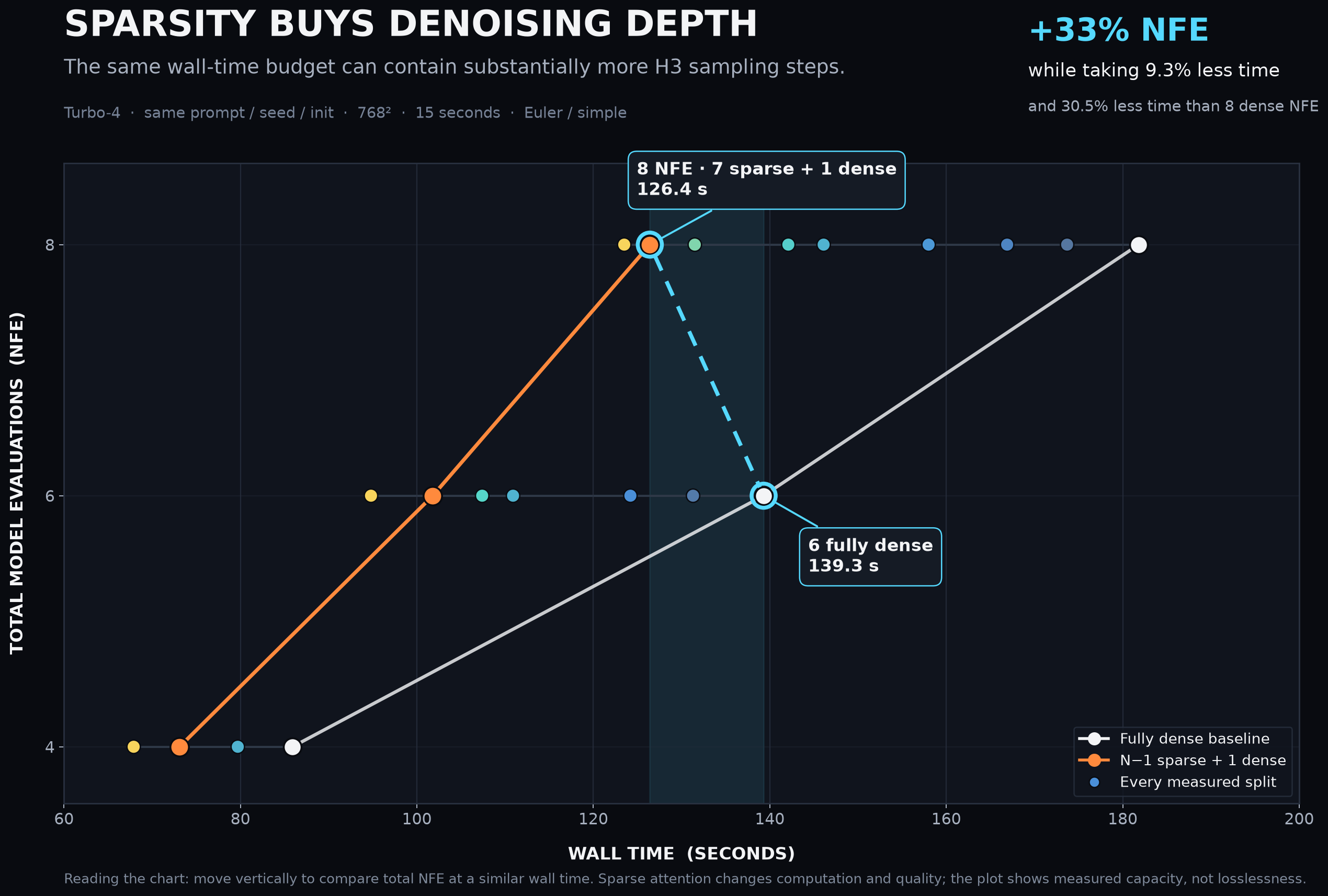
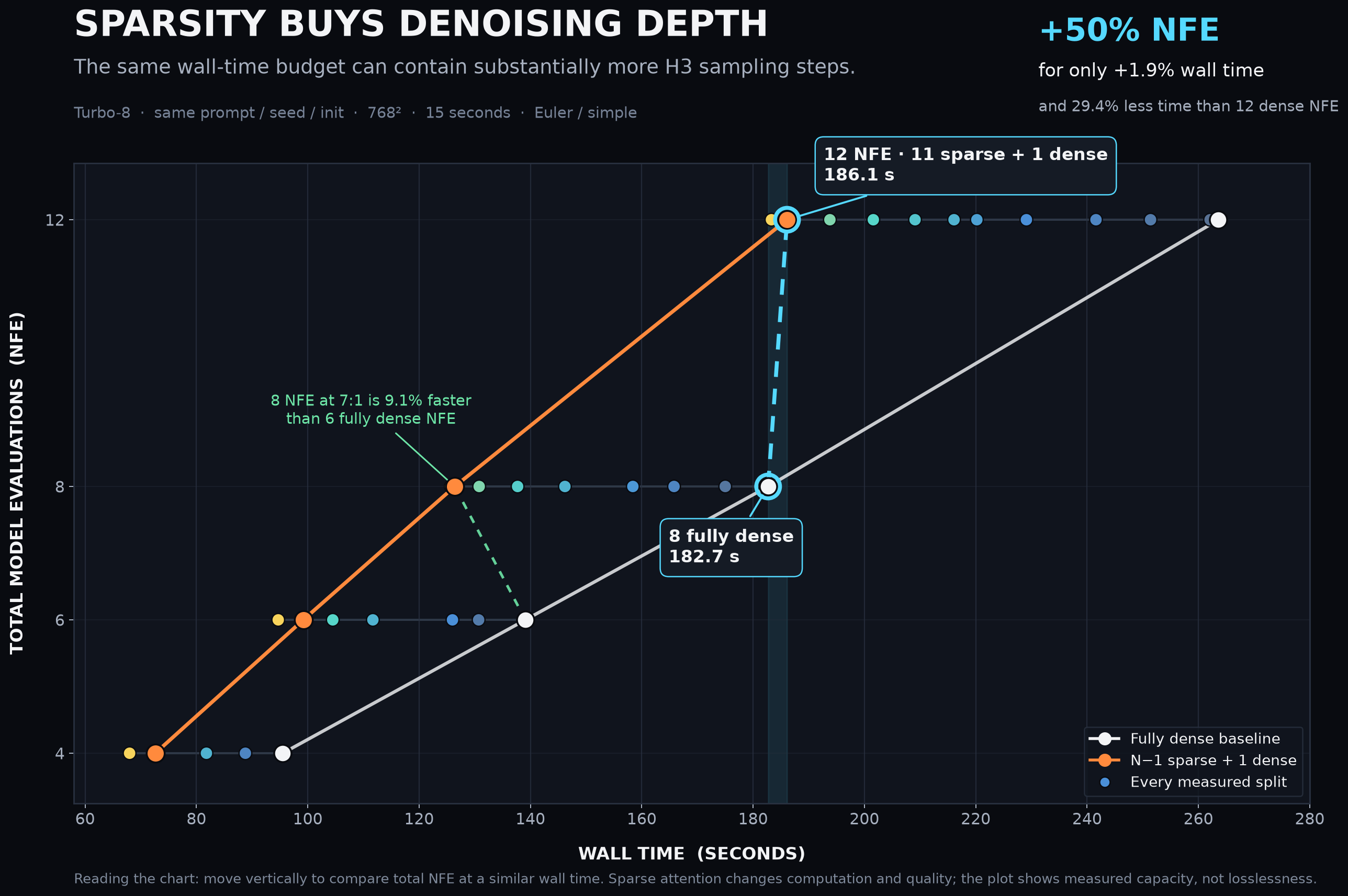
Time-equivalent depth

Spend sparsity on more denoising

These two views isolate the practical exchange: a longer schedule can fit inside—or very near—the wall-time envelope of a shorter fully dense run when most early evaluations are sparse and the final evaluation is dense.

Turbo 4 time-equivalence chart comparing six fully dense evaluations with eight evaluations split into seven sparse and one dense step
Turbo 4-step · measured RTX 6000 Pro S wall time
Turbo 8 time-equivalence chart comparing eight fully dense evaluations with twelve evaluations split into eleven sparse and one dense step
Turbo 8-step · measured RTX 6000 Pro S wall time

ComfyUI replication kit

One custom sampler. Everything around it stays stock.

H3-Optimizations 0.3.0 adds the exact integer-boundary sampler used here and no new Python dependencies. Import the workflow matching the Turbo adapter, choose the total schedule length in BasicScheduler, then set the sampler's sparse step count. The remaining evaluations are dense automatically.

Sampler / scheduler
Euler / Simple
Sparse attention
Kitchen INT8 · 30% video KV
Handoff
Same latent and sigmas · no fresh noise
Dense finish
Comfy Kitchen INT8

Focused A/B comparison

What one final dense step changes

Match every all-dense control against the schedule that keeps all but its final evaluation sparse. Start either player independently; starting one automatically pauses the other so their audio never overlaps.

A · Dense control

All dense · 4 NFE

85.9 sgeneration time

B · One dense finish

3 sparse → 1 dense · 4 NFE

73.1 sgeneration time
12.8 s saved14.9% faster than the matched all-dense control

55-render addendum

Every integer handoff, three at a time

Choose the four- or eight-step Turbo family, select a total NFE budget, then move through each sparse-to-dense boundary in sets of three. Every sequence keeps the same first frame, prompt, seed, base checkpoint, Euler sampler, Simple schedule, and continuous latent. The sparse stage uses a 30% video-KV budget; the dense stage uses Comfy Kitchen INT8.

21 sequences

4-step Turbo gallery

4 total NFE

All dense · 4 steps

85.9 s
4 dense

dense timing baseline

4 total NFE

Sparse 1 → dense 3

86.1 s
1 sparse3 dense

0.3 s longer · 0.3%

4 total NFE

Sparse 2 → dense 2

79.7 s
2 sparse2 dense

6.2 s saved · 7.2%

Showing 13 of 5 schedules at 4 total NFE

34 sequences

8-step Turbo gallery

4 total NFE

All dense · 4 steps

95.5 s
4 dense

dense timing baseline

4 total NFE

Sparse 1 → dense 3

88.8 s
1 sparse3 dense

6.7 s saved · 7.0%

4 total NFE

Sparse 2 → dense 2

81.8 s
2 sparse2 dense

13.8 s saved · 14.4%

Showing 13 of 5 schedules at 4 total NFE

Context / prior art

MiniMax H3 was trained with native sparse attention, although its initial open release exposed full-attention inference. Contemporary work has explored training-free and learned sparse attention for video diffusion through systems including Sol-Attn, RainFusion, PASA, and SLA.

H3-specific community implementations have also introduced timestep-dependent sparsity. Scheduled H3 Sol-Attn ramps attention density through sampling; vLLM-Omni's Sol-Attn studyevaluates leading dense-step guards; and its RainFusion tail fallback adds an explicit final dense window. ComfyUI implementations from PlagueKind and Turing Utilsexpose related H3 sparse-attention and dense-guard controls.

Recent H3 results from LMSYS, SGLang, NVIDIA, and Ant Group further quantify the speed-similarity tradeoff, while H3-Swift's negative Sol-Attn findings document the risk of temporal pulsing and flicker. NVIDIA's H3 Super Acceleration explores a separate H3-draft-to-LTX-refinement pipeline.

This study adds a controlled, reproducible H3 Turbo ablation across every integer sparse-to-dense handoff at fixed 4-, 6-, 8-, and 12-NFE budgets, using matched inputs and publishing measured wall times and the complete output set for direct comparison.